Im Nachgang zu den ersten hier dokumentierten Recherchen PTO for your hands?! hier nun weitere Ergebnisse. Konsultiert wurden diese beiden Datenbanken:
StT Opem Spurce Apps
StT fpr MS Word
Aus letzterer wurden nochmals diese Anwendungen untersucht:
Lassen Sie Ihre Audio- und Videodateien vom weltweit besten KI-Transkriptionsdienst transkribieren, mit einer Genauigkeit von 99 % für über 99 Sprachen.
Dictation with Windows Speech Recognition (WSR) works well for "WSR-friendly" applications like MS Word, Outlook, and PowerPoint. Dictated text is inserted directly into document text, and commands...
Super, genau das, was gebraucht wird. Aber die letzte Version 3.1 ist mehr als ein Jahrzehnt alt.
Zu guter letzt nochmals eine Anfrage bei MS Copilot:
Best Speech to Text Software for Microsoft Word Search
The best speech-to-text software for Microsoft Word includes Dragon NaturallySpeaking, Microsoft’s built-in Voice Typing, and Otter.ai, all of which integrate smoothly with Word for dictation and transcription. These tools stand out for accuracy, ease of use, and compatibility with Windows and Office environments.
Top Speech-to-Text Options for Microsoft Word
1. Dragon NaturallySpeaking (Nuance)
Accuracy: Industry-leading recognition, especially for professional use.
Integration: Works seamlessly with Microsoft Word.
Features: Custom vocabulary, voice commands, and transcription of recordings.
Best for: Professionals, writers, and legal/medical fields where precision is critical.
2. Microsoft Voice Typing (Windows 10/11)
Built-in & Free: Available directly in Windows (Win + H shortcut).
Ease of Use: No installation required, works instantly in Word.
Limitations: Accuracy may vary with accents and background noise.
Best for: Casual users who want a free, simple solution.
[...]
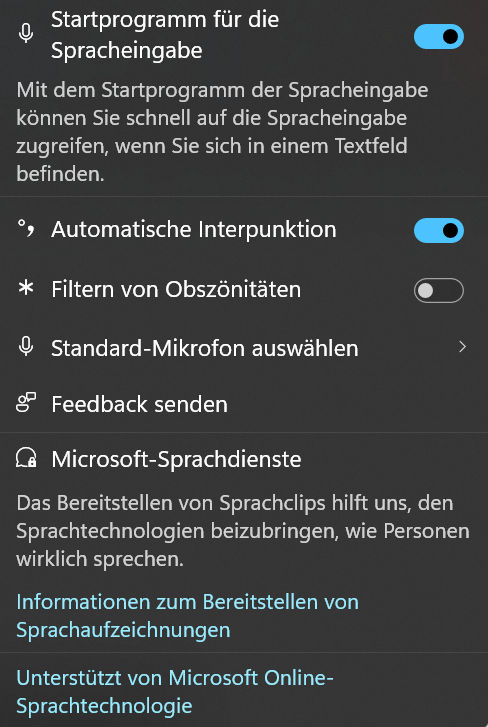
Also werden die „Windows“-und die „H“Taste gleichzeitig gedrückt. Die Einstellungen werden angepasst ...
... danach das Mikrofonsymbol aktiviert und ein erster Testlauf in einem Word-Dokument erfolgreich durchgeführt. Mehr noch: Das Ergebnis ist, dass diese letzte hier eingetragene Zeile per Mikrofon direkt auch auf diese Online-Seite übertragen werden konnte. Heureka!
 DaybyDay ISSN 1860-2967